





ಬೆಂಗಳೂರು: ರಾಜ್ಯ ಸರ್ಕಾರಿ ನೌಕರರು ಬಡ್ತಿ, ಮುಂಬಡ್ತಿ ಸೇರಿದಂತೆ ವಿವಿಧ ಬಡ್ತಿಗಳನ್ನು ಪಡೆಯೋದಕ್ಕೆ ಕಂಪ್ಯೂಟರ್ ಆಧಾರಿತ ಪರೀಕ್ಷೆಯನ್ನು ( Computer Literacy Test-CLT) ತೇರ್ಗಡೆಯಾಗುವುದು ಕಡ್ಡಾಯವಾಗಿದೆ. ಹಾಗಾದ್ರೆ ಈ ಪರೀಕ್ಷೆಯ ಹೊಸ ಪಠ್ಯಕ್ರಮ ಏನು ಎನ್ನುವ ಸಂಪೂರ್ಣ ಮಾಹಿತಿ ಮುಂದಿದೆ ಓದಿ.
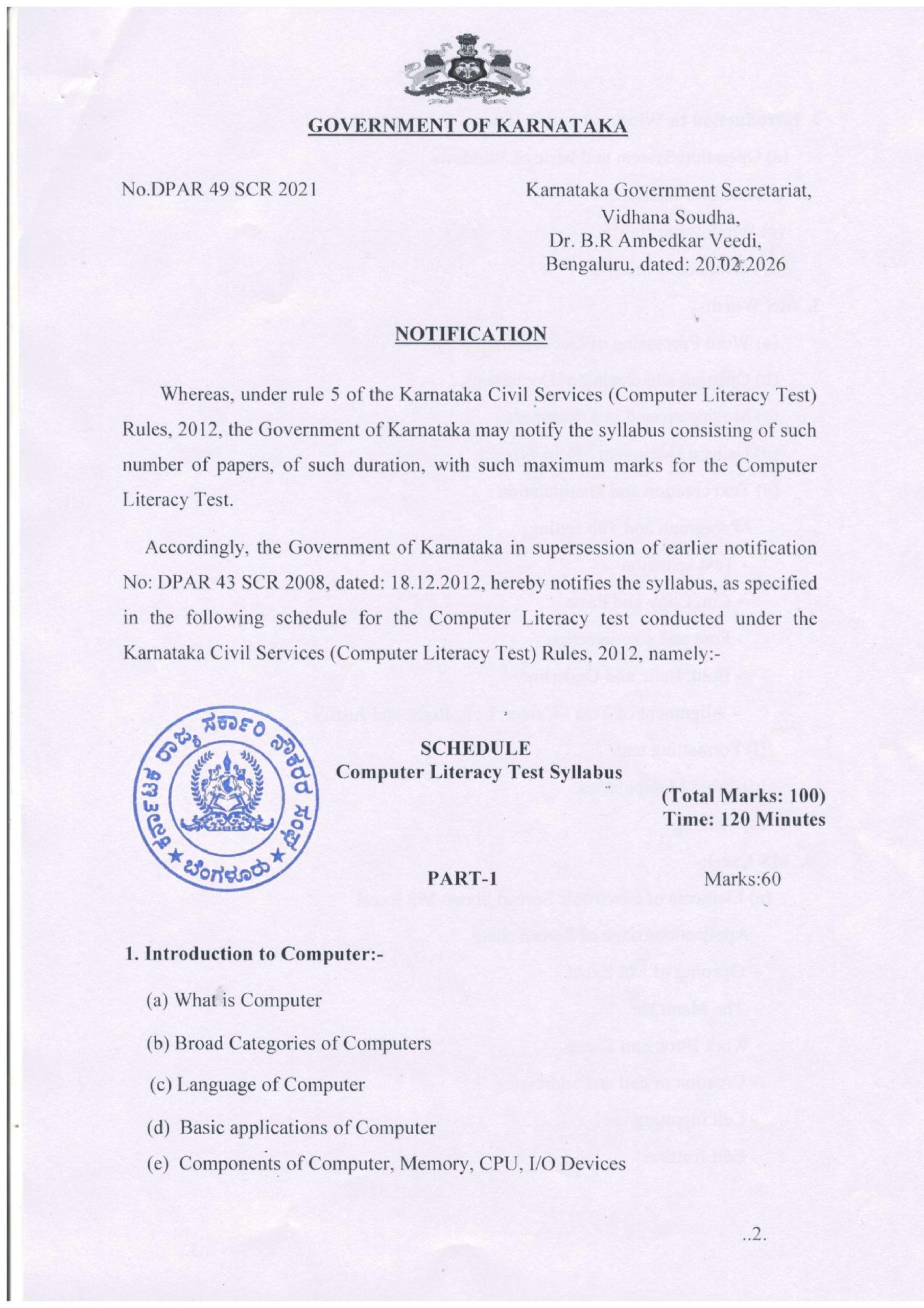
ಇಂದು ಈ ಕುರಿತಂತೆ ಅಧಿಸೂಚನೆಯನ್ನು ರಾಜ್ಯ ಸರ್ಕಾರ ಹೊರಡಿಸಿದೆ. ಅದರಲ್ಲಿ ಆದರೆ, ಕರ್ನಾಟಕ ನಾಗರಿಕ ಸೇವೆಗಳ (ಕಂಪ್ಯೂಟರ್ ಸಾಕ್ಷರತಾ ಪರೀಕ್ಷೆ) ನಿಯಮಗಳು, 2012 ರ ನಿಯಮ 5 ರ ಅಡಿಯಲ್ಲಿ, ಕರ್ನಾಟಕ ಸರ್ಕಾರವು ಕಂಪ್ಯೂಟರ್ ಸಾಕ್ಷರತಾ ಪರೀಕ್ಷೆಗೆ ಗರಿಷ್ಠ ಅಂಕಗಳೊಂದಿಗೆ ಅಂತಹ ಅವಧಿಯ ಪತ್ರಿಕೆಗಳ ಸಂಖ್ಯೆಯನ್ನು ಒಳಗೊಂಡಿರುವ ಪಠ್ಯಕ್ರಮವನ್ನು ಅಧಿಸೂಚನೆ ಮಾಡಬಹುದು.
ಅಂತೆಯೇ, ಕರ್ನಾಟಕ ಸರ್ಕಾರವು ಹಿಂದಿನ ಅಧಿಸೂಚನೆ ಸಂಖ್ಯೆ: DPAR 43 SCR 2008, ದಿನಾಂಕ: 18.12.2012 ಅನ್ನು ರದ್ದುಗೊಳಿಸಿ, ಕರ್ನಾಟಕ ನಾಗರಿಕ ಸೇವೆಗಳ (ಕಂಪ್ಯೂಟರ್ ಸಾಕ್ಷರತಾ ಪರೀಕ್ಷೆ) ನಿಯಮಗಳು, 2012 ರ ಅಡಿಯಲ್ಲಿ ನಡೆಸಲಾದ ಕಂಪ್ಯೂಟರ್ ಸಾಕ್ಷರತಾ ಪರೀಕ್ಷೆಗಾಗಿ ಈ ಕೆಳಗಿನ ವೇಳಾಪಟ್ಟಿಯಲ್ಲಿ ನಿರ್ದಿಷ್ಟಪಡಿಸಿದಂತೆ ಪಠ್ಯಕ್ರಮವನ್ನು ಈ ಮೂಲಕ ಅಧಿಸೂಚನೆ ಮಾಡುತ್ತದೆ, ಅವುಗಳೆಂದರೆ:-
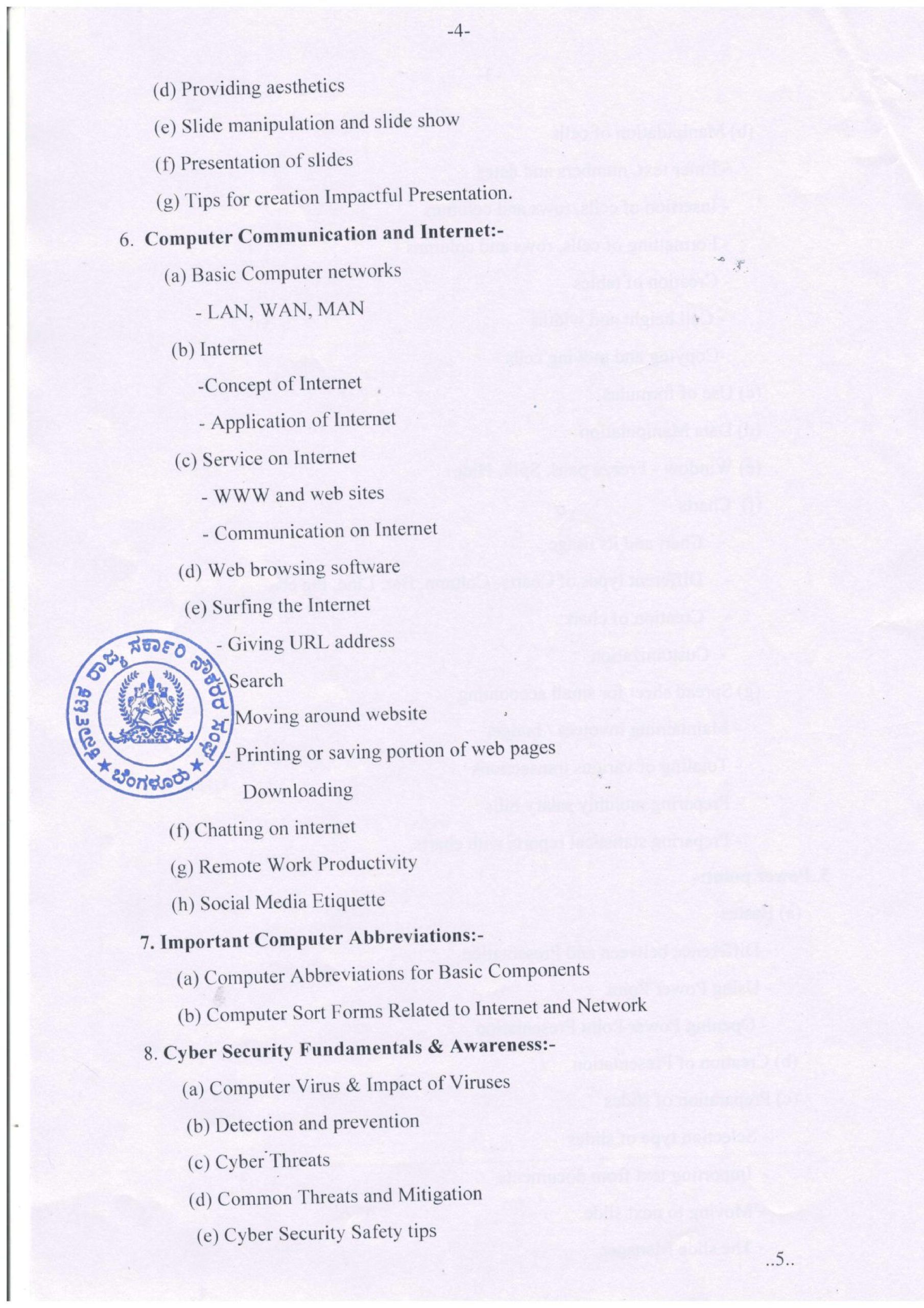
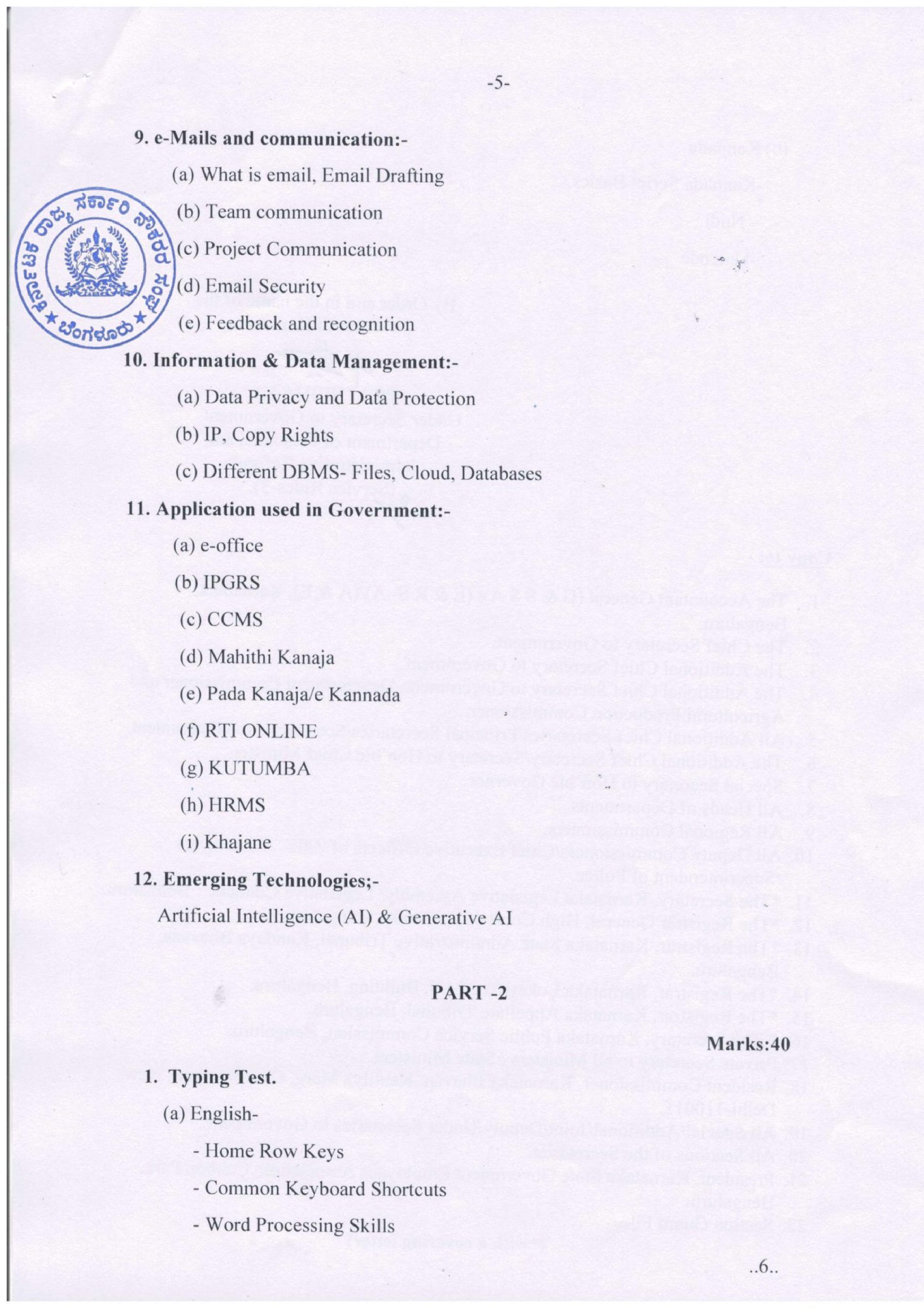
Computer Literacy Test Syllabus
PART-1
1. Introduction to Computer:-
(a) What is Computer
(b) Broad Categories of Computers
(c) Language of Computer
(d) Basic applications of Computer
(e) Components of Computer, Memory, CPU, I/O Devices
(Total Marks: 100)
Time: 120 Minutes
Marks:60
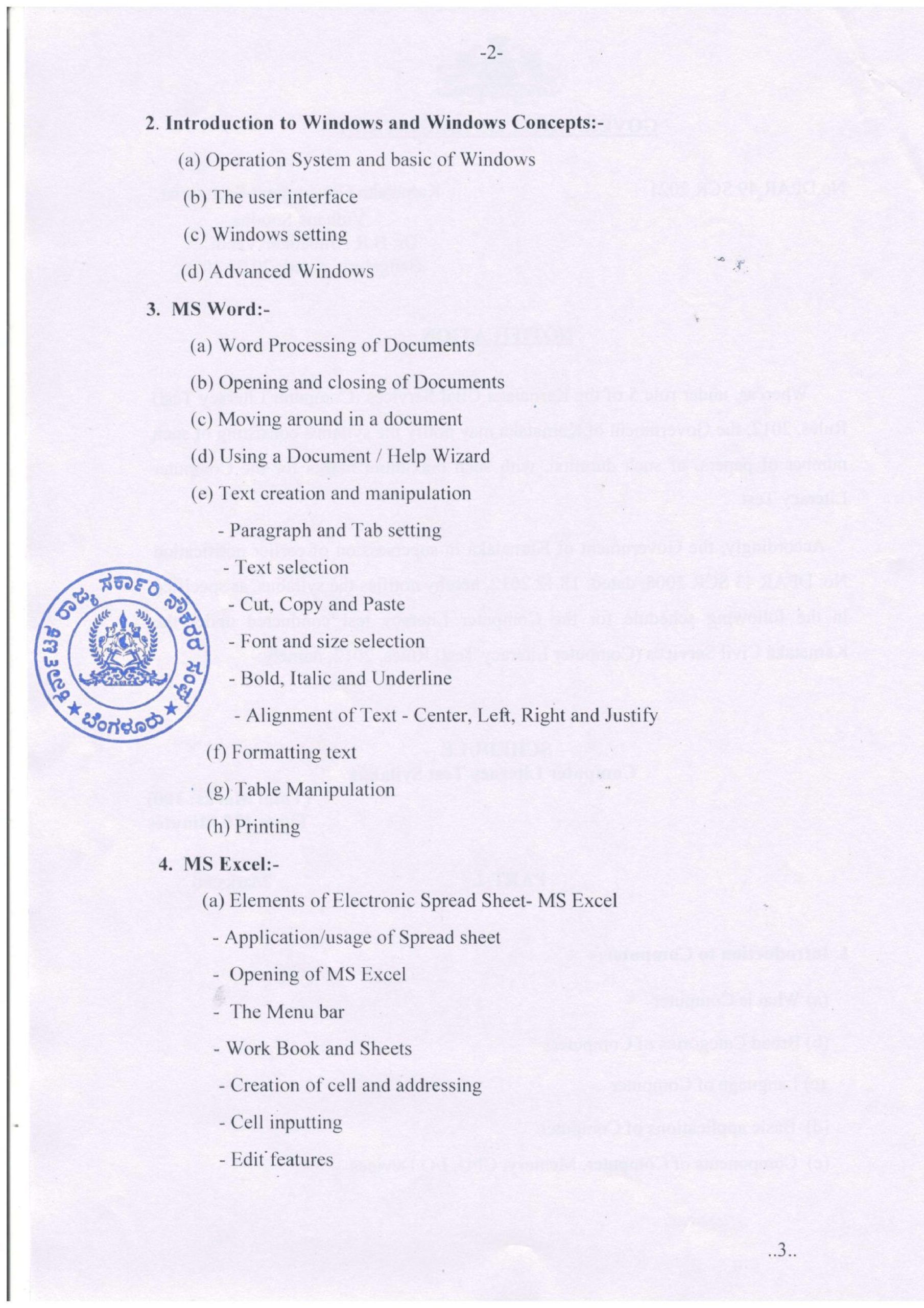
2. Introduction to Windows and Windows Concepts:-
(a) Operation System and basic of Windows
(b) The user interface
(c) Windows setting
(d) Advanced Windows
3. MS Word:-
(a) Word Processing of Documents
(b) Opening and closing of Documents
(c) Moving around in a document
(d) Using a Document / Help Wizard (e) Text creation and manipulation
– Paragraph and Tab setting Text selection Cut, Copy and Paste
– Font and size selection
– Bold, Italic and Underline
– Alignment of Text – Center, Left, Right and Justify
(f) Formatting text
(g) Table Manipulation
(h) Printing
4. MS Excel:-
(a) Elements of Electronic Spread Sheet- MS Excel
– Application/usage of Spread sheet
– Opening of MS Excel
The Menu bar
Work Book and Sheets
– Creation of cell and addressing
-Cell inputting
– Edit features
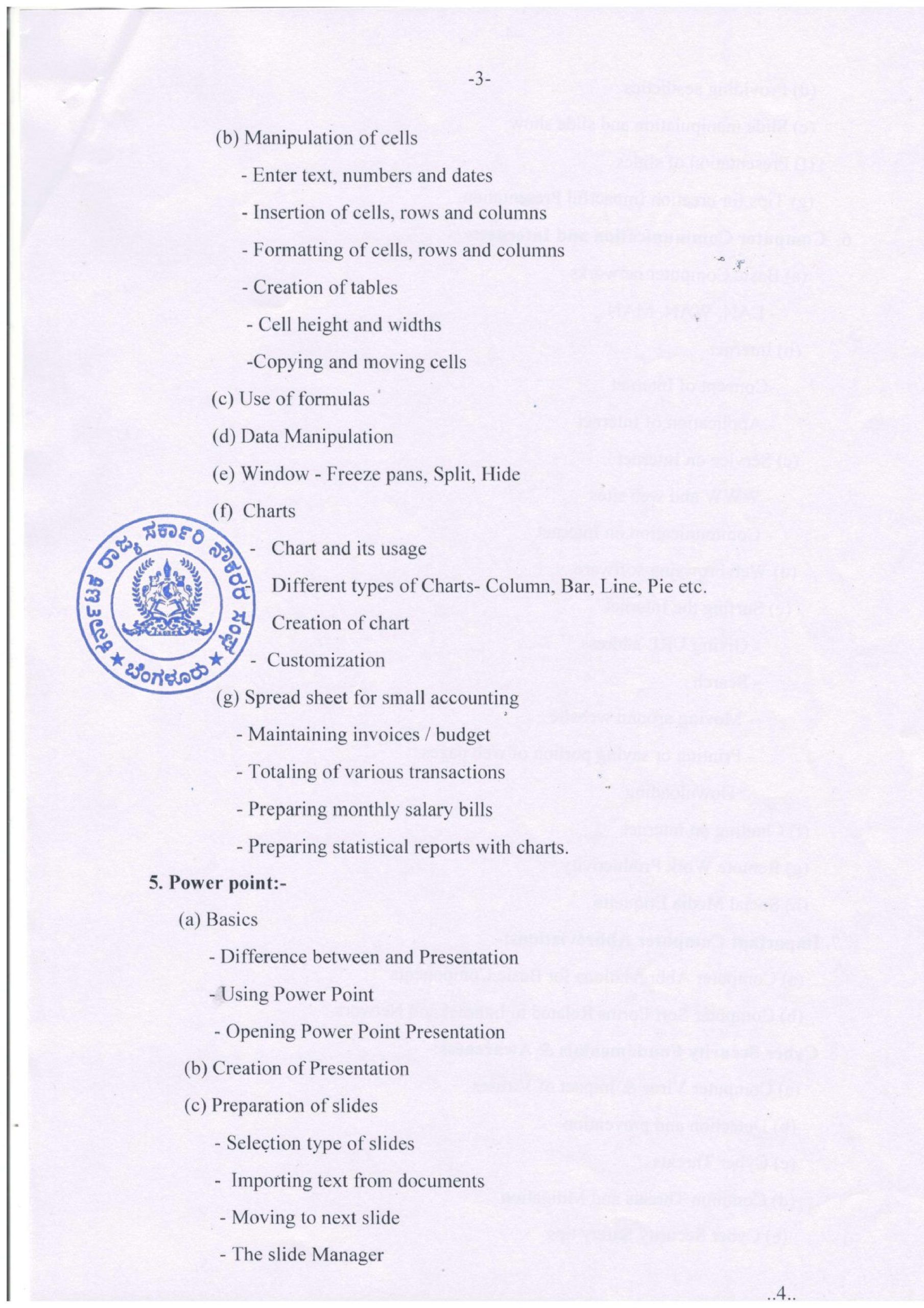
(b) Manipulation of cells
– Enter text, numbers and dates
Insertion of cells, rows and columns
– Formatting of cells, rows and columns
-Creation of tables
– Cell height and widths
-Copying and moving cells
(c) Use of formulas
(d) Data Manipulation
(e) Window – Freeze pans, Split, Hide
(f) Charts
Chart and its usage Different types of Charts- Column, Bar, Line, Pie etc.
Creation of chart Customization
(g) Spread sheet for small accounting
– Maintaining invoices / budget
– Totaling of various transactions
– Preparing monthly salary bills
– Preparing statistical reports with charts.
5. Power point:-
(a) Basics
– Difference between and Presentation
– Using Power Point
– Opening Power Point Presentation
(b) Creation of Presentation
(c) Preparation of slides
Selection type of slides
– Importing text from documents
Moving to next slide
– The slide Manager
ಸ್ವತಂತ್ರರಾದರೂ ಅತಂತ್ರರಾಗಿಯೇ ಇದ್ದೇವೆ: ಎಎಪಿ ರಾಜ್ಯಾಧ್ಯಕ್ಷ ಮುಖ್ಯಮಂತ್ರಿ ಚಂದ್ರು
ಬೆಂಗಳೂರಲ್ಲಿ ಓರ್ವ ಡ್ರಗ್ ಪೆಡ್ಲರ್ ಅರೆಸ್ಟ್, 3.8 ಲಕ್ಷ ಮೌಲ್ಯದ 35 ಗ್ರಾಂ ಮಾದಕ ವಸ್ತು ವಶಕ್ಕೆ